Typing Test App for Exams
(Premium Unlocked)Version: 11.2.1
By: FAIRSOFTTECH
Size: 12.00 MB
Release Date: 21 Dec 2025
Download APK How to Install APK FileBrand Name : FAIRSOFTTECH
Developer : FairSoftTech
App Size : 12.00 MB
Email Id : support@fairsofttech.com
Version : 11.2.1
Privacy Policy : Click Here
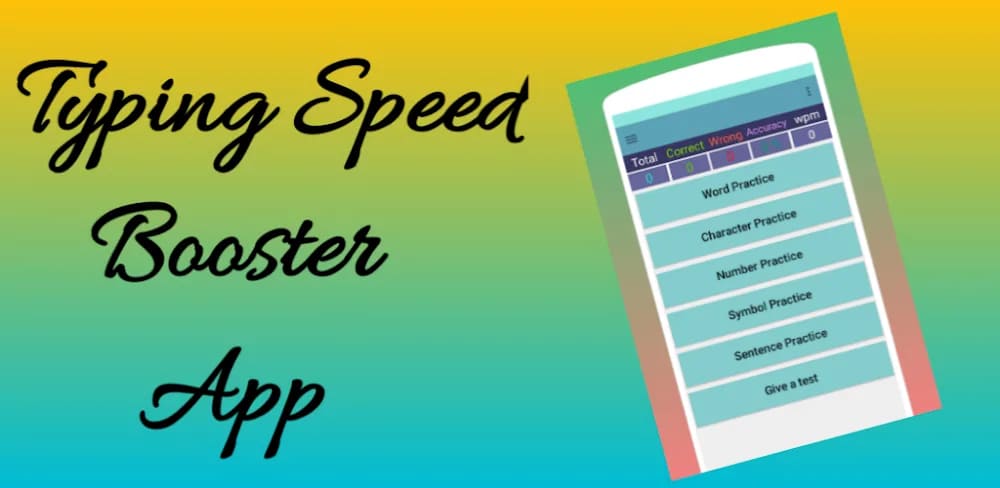
Typing Test App for Exams is an Android app designed to help you practice typing tests directly on your mobile phone. It is especially useful for candidates preparing for competitive exams such as SSC (CGL, CHSL), Railway (NTPC), Banking, Stenographer, School Clerk, and many others. The app is also ideal for anyone who wants to learn typing or improve typing speed and accuracy for office work or typing projects.
Frequently Asked Questions (FAQ)
What is Typing Test App for Exams?
Typing Test App for Exams is an Android app that helps you practice typing tests using your mobile phone. It is designed for candidates preparing for exams such as SSC (CGL, CHSL), Railway (NTPC), Banking, Stenographer, School Clerk, and similar exams.
Who can use this app?
The app is useful for exam aspirants as well as anyone who wants to learn typing or improve typing speed and accuracy for office work or typing projects.
Do I need a computer to use this app?
No. You do not need a desktop or laptop. You only need an external keyboard and an OTG cable to connect the keyboard to your mobile phone and type like on a computer.
Does the app support real exam-style typing tests?
Yes. The app includes an Exam Mode that simulates real exam conditions with exam-oriented typing features.
What typing modes are available?
The app offers Learning Mode for beginners, Practice Mode for regular practice, and Exam Mode for real-test experience.
Can I track my typing speed and accuracy?
Yes. You can view instant results such as typing speed (WPM), total correct entries, total wrong entries, and accuracy. You can also choose to hide or show these results while typing.
Are different difficulty levels available?
Yes. The app provides multiple difficulty levels for typing paragraphs along with a wide collection of practice texts.
What types of typing practice does the app offer?
You can practice characters, words, numbers, and sentences to improve overall typing skills.
Can I customize the typing experience?
Yes. You can adjust text size, enable or disable text highlighting, and use auto-scroll or manual scroll while typing.
Does the app save my typing history?
Yes. The app stores your typing history so you can review past performance, analyze progress, and improve speed and accuracy over time.
Is the app free to use?
The app offers both free and premium features. Premium features are available through subscription plans.
What subscription plans are available?
There are four subscription plans: Monthly, Half-Yearly, Yearly, and Lifetime.
Does the subscription auto-renew?
Yes, if auto-renewal is enabled, the subscription will renew automatically unless canceled at least 24 hours before the renewal date.
Can I manage or cancel my subscription?
Yes. You can cancel, upgrade, downgrade, or manage your subscription and turn off auto-renewal from the Subscriptions section of your Google Play account.
Is there a free trial available?
Some subscription plans may include a free trial. During the trial period, you can access premium features at no cost. After the trial ends, the subscription will convert to a paid plan unless canceled.
How can I contact support?
If you have any questions or concerns, please contact us at support@fairsofttech.com.
If you want, I can also:
-
Shorten this FAQ for Play Store description
-
Create a beginner-focused FAQ
-
Rewrite it in a more formal or more casual tone
Popular Apps

.webp)
.webp)








New Apps

.webp)


.webp)

.webp)
.webp)
.webp)
.webp)
.webp)
.webp)
Latest Apps
.webp)
.webp)
.webp)
.webp)
.webp)
.webp)
.webp)
.webp)
.webp)
.webp)
.webp)
Total Reviews: 1
5 ★
4 ★
3 ★
2 ★
1 ★
Top Apps
-
.webp) Endel: Focus, Relax ⭐ 4.7
Endel: Focus, Relax ⭐ 4.7 -
.webp) Zen: Relax, Meditate ⭐ 3.7
Zen: Relax, Meditate ⭐ 3.7 -
.webp) Accupedo Pedometer ⭐ 4.4
Accupedo Pedometer ⭐ 4.4 -
.webp) Doodle Art: Magic Drawing App ⭐ 4.1
Doodle Art: Magic Drawing App ⭐ 4.1 -
.webp) Word Cloud ⭐ 4.1
Word Cloud ⭐ 4.1 -
.webp) PeakFinder ⭐ 4.3
PeakFinder ⭐ 4.3 -
.webp) Pass2U Wallet - Add store card ⭐ 4.0
Pass2U Wallet - Add store card ⭐ 4.0 -
.webp) Travel Tracker - GPS tracker ⭐ 3.8
Travel Tracker - GPS tracker ⭐ 3.8 -
.webp) OruxMaps GP ⭐ 4.0
OruxMaps GP ⭐ 4.0 -
.webp) PeakVisor - 3D Maps & Peaks Id ⭐ 3.9
PeakVisor - 3D Maps & Peaks Id ⭐ 3.9 -
.webp) Planes Live - Flight Tracker ⭐ 4.3
Planes Live - Flight Tracker ⭐ 4.3