.webp)
Highlight Cover Maker of Story
(VIP Unlocked)Version: 2.6.7
By: RYZENRISE
Size: 18.00 MB
Release Date: 03 Feb 2026
Download APK How to Install APK FileBrand Name : RYZENRISE
App Size : 18.00 MB
Email Id : ryzengchang@outlook.com
Version : 2.6.7
Privacy Policy : Click Here
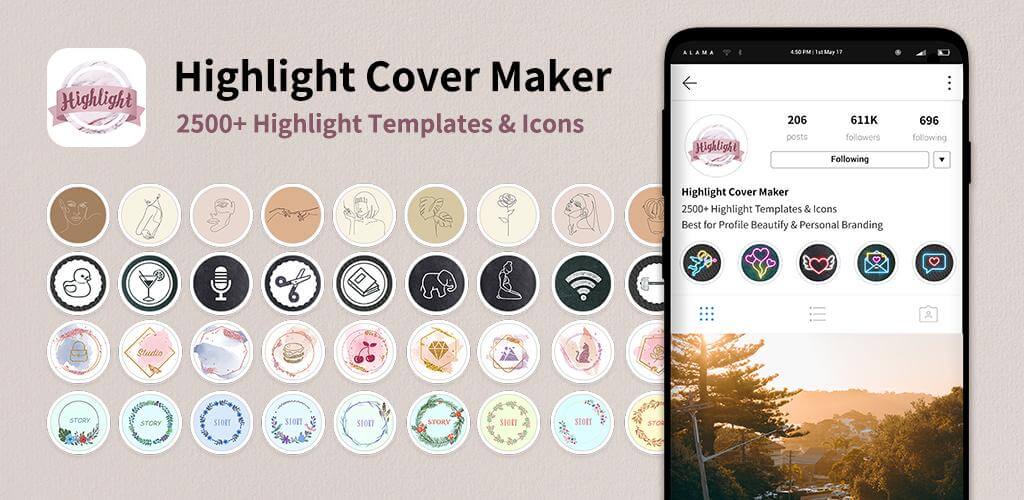
Highlight Cover Maker The Ultimate Instagram Highlight Cover Editor & Creator Highlight Cover Maker is an easy-to-use story cover editor for Instagram that helps you create high-quality highlight covers to level up your profile. Stylish highlight covers make your profile look more professional, boost engagement, and help you attract more likes and followers. It’s a must-have Instagram tool—right alongside your collage maker and feed planner. Your Instagram profile is often the first impression you make. With beautifully designed story highlight covers and titles, you can showcase your personality, tell your story, and stand out from the crowd. Highlight Cover Maker is your all-in-one IG Story Highlight design lab.
Frequently Asked Questions (FAQ)
What is Highlight Cover Maker?
Highlight Cover Maker is an Instagram story highlight cover editor that helps you design stylish, high-quality highlight covers to make your profile look more professional and visually appealing.
Why do Instagram highlight covers matter?
Highlight covers are often the first thing people notice on your profile. Well-designed covers help you create a strong first impression, organize your stories, and attract more followers.
Do I need design experience to use Highlight Cover Maker?
No. The app is designed for everyone. You can use ready-made templates or create your own designs from scratch using easy drag-and-drop tools.
What does Highlight Cover Maker include?
The app includes:
-
200+ highlight cover templates
-
500+ icons, logos, and stickers
-
Free color palettes and textures
-
Background images, borders, and frames
-
Text tools with stylish fonts
-
Editing tools to resize, trim, and adjust designs
Can I create my own custom highlight covers?
Yes. You can start from a blank canvas, upload your own photos or images, customize colors, add text, and design completely unique highlight covers.
Are the highlight covers the correct size for Instagram?
Yes. All highlight covers are designed in the 9:16 format and optimized for Instagram, so you don’t have to worry about sizing issues.
Can I use the highlight covers on other platforms?
Yes. You can also use your designs on Facebook, Twitter, or other social platforms.
Can I preview my highlight covers before uploading?
Yes. The preview feature lets you see exactly how your highlight covers will look on your Instagram profile before you upload them.
Can I add text to my highlight covers?
Absolutely. You can add titles, captions, and decorative text using a variety of fonts and styles.
Can I upload my own images or icons?
Yes. You can upload images from your gallery or Pinterest and incorporate them into your highlight cover designs.
Is Highlight Cover Maker free to use?
Highlight Cover Maker is free to download and includes many free templates, icons, and tools. Some advanced features and premium content may require in-app purchases.
How do I add a highlight cover to Instagram?
-
Long-press a highlight on your Instagram profile
-
Tap Edit Highlight
-
Tap Edit Cover
-
Upload your saved cover
-
Crop and preview
Can I share my designs with others?
Yes! Share your highlight covers on Instagram and tag #HighlightCoverMaker to get featured and reach more users.
Is a logo maker included?
A logo maker feature is coming soon, allowing you to create personal or business logos using customizable templates and graphics.
Popular Apps

.webp)
.webp)








New Apps

.webp)


.webp)

.webp)
.webp)
.webp)
.webp)
.webp)
.webp)
Latest Apps
.webp)
.webp)
.webp)
.webp)
.webp)
.webp)
.webp)
.webp)
.webp)
.webp)
.webp)
Total Reviews: 1
5 ★
4 ★
3 ★
2 ★
1 ★
Top Apps
-
.webp) Endel: Focus, Relax ⭐ 4.7
Endel: Focus, Relax ⭐ 4.7 -
.webp) Zen: Relax, Meditate ⭐ 3.7
Zen: Relax, Meditate ⭐ 3.7 -
.webp) Accupedo Pedometer ⭐ 4.4
Accupedo Pedometer ⭐ 4.4 -
.webp) Doodle Art: Magic Drawing App ⭐ 4.1
Doodle Art: Magic Drawing App ⭐ 4.1 -
.webp) Word Cloud ⭐ 4.1
Word Cloud ⭐ 4.1 -
.webp) PeakFinder ⭐ 4.3
PeakFinder ⭐ 4.3 -
.webp) Pass2U Wallet - Add store card ⭐ 4.0
Pass2U Wallet - Add store card ⭐ 4.0 -
.webp) Travel Tracker - GPS tracker ⭐ 3.8
Travel Tracker - GPS tracker ⭐ 3.8 -
.webp) OruxMaps GP ⭐ 4.0
OruxMaps GP ⭐ 4.0 -
.webp) PeakVisor - 3D Maps & Peaks Id ⭐ 3.9
PeakVisor - 3D Maps & Peaks Id ⭐ 3.9 -
.webp) Planes Live - Flight Tracker ⭐ 4.3
Planes Live - Flight Tracker ⭐ 4.3