.webp)
Fulguris Web Browser
(Premium Unlocked)Version: 2.0.2
By: SLIONS
Size: 7.00 MB
Release Date: 26 Dec 2025
Download APK How to Install APK FileBrand Name : SLIONS
Developer : Slions
App Size : 7.00 MB
Email Id : googleplay@slions.net
Version : 2.0.2
Privacy Policy : Click Here
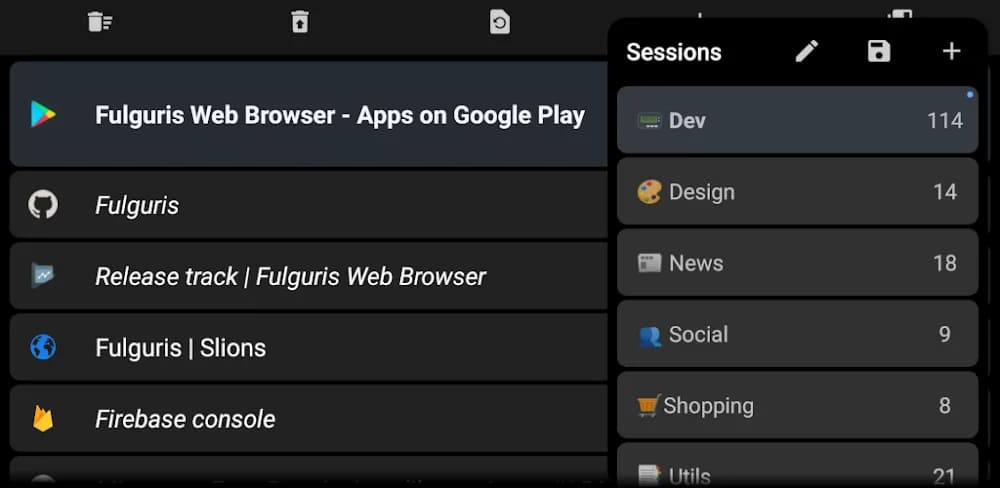
Features Overview 📑 Sessions All tabs are organized into sessions. You can create multiple named sessions to stay focused and keep things organized. Switching between sessions is extremely fast, and each session can hold hundreds of tabs.
Frequently Asked Questions (FAQ)
What are Sessions in Fulguris?
Sessions let you organize your tabs into named groups. You can create multiple sessions to stay focused, switch between them instantly, and store hundreds of tabs in each session.
Can I customize the address bar position?
Yes. The smart address bar combines the address, title, and search functions and can be placed at either the top or bottom of the screen, depending on your preference and screen orientation.
How does tab management work?
Tabs are automatically created when you search or enter a web address, so you usually don’t need to press a new tab button. You can adjust settings if you prefer to limit the number of open tabs.
What is the Vertical Tab Panel?
The vertical tab panel allows you to reorder tabs using drag-and-drop. You can swipe right to move tabs to the trash and restore them later from the panel toolbar.
What is the Horizontal Tab Bar?
The horizontal tab bar provides a classic desktop-style browsing experience. It’s especially useful on tablets and desktop modes like Samsung DeX or Huawei EMUI Desktop and can be positioned at the top or bottom of the screen.
Does Fulguris support different screen orientations?
Yes. Fulguris offers separate layout and behavior settings for portrait and landscape modes, ensuring optimal use of screen space. Optional pull-to-refresh is also available.
How do bookmarks work in Fulguris?
You can import, export, organize, and group bookmarks into folders using drag-and-drop. Bookmarks can also be backed up and restored directly from cloud services.
Can I view and clear my browsing history?
Yes. You can review your browsing history at any time and clear it whenever you choose.
Is there a dark mode?
Yes. Fulguris includes a force dark mode that allows any website to be displayed in dark mode, making late-night reading more comfortable.
Does Fulguris support themes?
Yes. The browser supports black, dark, and light themes. Toolbar and status bar colors integrate smoothly with websites for a clean, modern look.
Is there an ad blocker included?
Yes. Fulguris includes a built-in ad blocker that supports local and online filter lists, hosts files, and most Adblock Plus syntax.
How does Fulguris protect my privacy?
Fulguris respects user privacy with features such as incognito mode, tracking cookie control, and options to clear tabs, history, cookies, and cache. It also provides third-party app management.
What search engines are supported?
Fulguris supports multiple search engines, including Google, Bing, Yahoo, StartPage, and DuckDuckGo. It also includes in-page text search and Google search suggestions.
Are accessibility features available?
Yes. Fulguris includes reader mode and multiple rendering options such as inverted colors, high contrast, and grayscale.
Does Fulguris support keyboard shortcuts?
Yes. Keyboard shortcuts and focus management are supported, including quick tab switching using CTRL + TAB. A full list of shortcuts is available on the official website.
Is hardware acceleration supported?
Yes. Fulguris uses hardware acceleration to maximize your device’s processing power for better performance.
Can I customize browser settings?
Absolutely. Fulguris offers extensive settings to fine-tune the browser, including options specific to screen orientation.
What touch controls are available?
Fulguris supports intuitive touch gestures such as long-pressing to organize tabs and bookmarks, swiping right on tabs to close them, and long-pressing icons to display tooltips.
Which devices have been tested with Fulguris?
Fulguris has undergone basic testing on devices including Huawei P30 Pro, Samsung Galaxy Tab S6, F(x)tec Pro¹, LG G8X ThinQ, Samsung Galaxy S7 Edge, HTC One M8, and LG Leon.
Popular Apps

.webp)
.webp)








New Apps

.webp)


.webp)

.webp)
.webp)
.webp)
.webp)
.webp)
.webp)
Latest Apps
.webp)
.webp)
.webp)
.webp)
.webp)
.webp)
.webp)
.webp)
.webp)
.webp)
.webp)
Total Reviews: 1
5 ★
4 ★
3 ★
2 ★
1 ★
Top Apps
-
.webp) Endel: Focus, Relax ⭐ 4.7
Endel: Focus, Relax ⭐ 4.7 -
.webp) Zen: Relax, Meditate ⭐ 3.7
Zen: Relax, Meditate ⭐ 3.7 -
.webp) Accupedo Pedometer ⭐ 4.4
Accupedo Pedometer ⭐ 4.4 -
.webp) Doodle Art: Magic Drawing App ⭐ 4.1
Doodle Art: Magic Drawing App ⭐ 4.1 -
.webp) Word Cloud ⭐ 4.1
Word Cloud ⭐ 4.1 -
.webp) PeakFinder ⭐ 4.3
PeakFinder ⭐ 4.3 -
.webp) Pass2U Wallet - Add store card ⭐ 4.0
Pass2U Wallet - Add store card ⭐ 4.0 -
.webp) Travel Tracker - GPS tracker ⭐ 3.8
Travel Tracker - GPS tracker ⭐ 3.8 -
.webp) OruxMaps GP ⭐ 4.0
OruxMaps GP ⭐ 4.0 -
.webp) PeakVisor - 3D Maps & Peaks Id ⭐ 3.9
PeakVisor - 3D Maps & Peaks Id ⭐ 3.9 -
.webp) Planes Live - Flight Tracker ⭐ 4.3
Planes Live - Flight Tracker ⭐ 4.3