.webp)
Colors Shapeless Icon Pack
(Full Version)Version: 5.9
By: PIZZAPP DESIGN
Size: 43.00 MB
Release Date: 12 Dec 2025
Download APK How to Install APK FileBrand Name : PIZZAPP DESIGN
App Size : 43.00 MB
Email Id : pizzappdesign@protonmail.com
Version : 5.9
Privacy Policy : Click Here
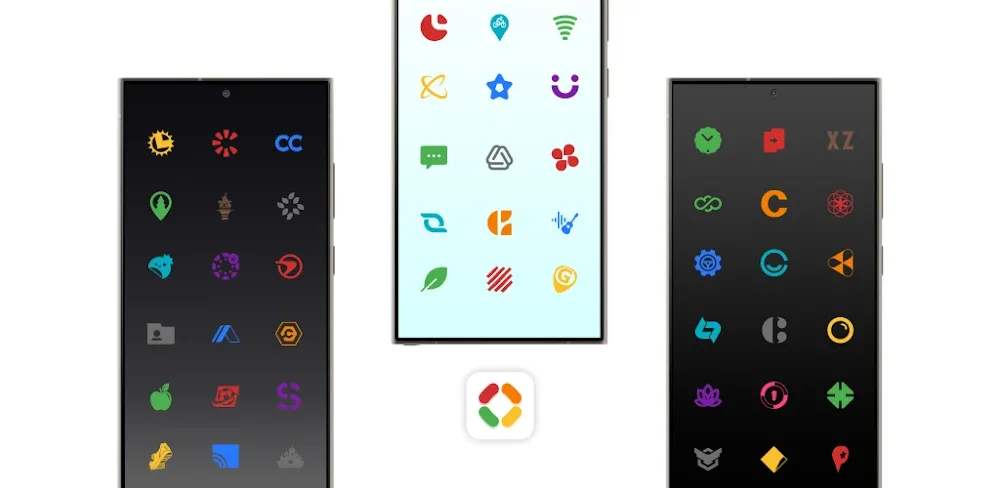
🌈 Colors Shapeless Icon Pack features a carefully curated 10-color palette that replaces original app icon styles, delivering a clean, bold, and consistently modern appearance.
❓ Frequently Asked Questions (FAQ)
1. What is Colors Shapeless Icon Pack?
Colors Shapeless Icon Pack is a modern Android icon pack featuring a curated 10-color palette that replaces original app icon styles, creating a clean, consistent, and visually striking home screen.
2. What style does this icon pack use?
The icons follow a minimal, shapeless, and colorful design that looks vibrant and balanced on both dark and light wallpapers.
3. How many icons are included?
The pack includes 25,000+ custom colored icons and provides theming support for 45,000+ apps, with regular updates.
4. Do I need a launcher to use this icon pack?
Yes. A third-party launcher or compatible OEM launcher is required, as default Android launchers usually do not support icon packs.
5. Which launchers are supported?
This icon pack supports many popular launchers, including:
Nova Launcher, Niagara, Lawnchair, Hyperion, Microsoft Launcher, Nothing Launcher, POCO Launcher, Realme UI, Samsung One UI (via Theme Park), OxygenOS, Pixel Launcher (with Shortcut Maker), and many others.
Some unlisted launchers may also be compatible.
6. How do I apply the icon pack?
-
Install a supported launcher
-
Open the Colors Shapeless Icon Pack app
-
Tap Apply, or select the icon pack from your launcher’s settings
7. Are wallpapers included?
Yes. The icon pack includes exclusive color-optimized wallpapers designed to complement the icon palette.
8. Does this icon pack support dynamic calendar icons?
Yes. Dynamic calendar icons are available on supported launchers.
9. Why are some icons showing as gray or unthemed?
Some apps—especially system apps or apps not available on the Play Store—may appear as generic gray icons. Icon masking/backgrounds are applied to maintain consistency.
10. Can I report incorrect icon colors?
Yes! Your feedback is very welcome. If you notice icons with incorrect colors or generic placeholders, please report them so they can be corrected in future updates.
11. Can I request missing icons?
Absolutely. You can submit free or premium icon requests directly from the app. Requested icons are added as quickly as possible in upcoming updates.
12. How often is the icon pack updated?
The icon pack receives regular updates, adding new icons, app support, and design improvements.
13. Which app categories are supported?
The icon pack covers a wide range of apps, including:
-
System apps
-
Google apps
-
Stock OEM apps
-
Social apps
-
Media apps
-
Games
-
Many other popular apps
14. Why doesn’t the icon pack work on my device?
Please ensure:
-
You are using a supported launcher
-
Your device or OEM launcher supports icon packs
Some stock launchers do not allow custom icon packs.
15. Where can I get help or contact support?
If you need assistance, you can reach us via:
-
Email: pizzappdesign@protonmail.com
-
Link in Bio: linktr.ee/pizzappdesign
Please review this FAQ before emailing.
16. Who created the dashboard and UI icons?
-
App dashboard by Dani Mahardhika & Sarsamurmu (Apache License 2.0)
-
UI icons provided by Icons8
If you’d like, I can also:
• Shorten this FAQ for Play Store listing
• Convert it into an expandable in-app FAQ
• Rewrite it in a more casual or marketing tone
Just let me know 😊
Popular Apps

.webp)
.webp)








New Apps

.webp)


.webp)

.webp)
.webp)
.webp)
.webp)
.webp)
.webp)
Latest Apps
.webp)
.webp)
.webp)
.webp)
.webp)
.webp)
.webp)
.webp)
.webp)
.webp)
.webp)
Total Reviews: 1
5 ★
4 ★
3 ★
2 ★
1 ★
Top Apps
-
.webp) Endel: Focus, Relax ⭐ 4.7
Endel: Focus, Relax ⭐ 4.7 -
.webp) Zen: Relax, Meditate ⭐ 3.7
Zen: Relax, Meditate ⭐ 3.7 -
.webp) Accupedo Pedometer ⭐ 4.4
Accupedo Pedometer ⭐ 4.4 -
.webp) Doodle Art: Magic Drawing App ⭐ 4.1
Doodle Art: Magic Drawing App ⭐ 4.1 -
.webp) Word Cloud ⭐ 4.1
Word Cloud ⭐ 4.1 -
.webp) PeakFinder ⭐ 4.3
PeakFinder ⭐ 4.3 -
.webp) Pass2U Wallet - Add store card ⭐ 4.0
Pass2U Wallet - Add store card ⭐ 4.0 -
.webp) Travel Tracker - GPS tracker ⭐ 3.8
Travel Tracker - GPS tracker ⭐ 3.8 -
.webp) OruxMaps GP ⭐ 4.0
OruxMaps GP ⭐ 4.0 -
.webp) PeakVisor - 3D Maps & Peaks Id ⭐ 3.9
PeakVisor - 3D Maps & Peaks Id ⭐ 3.9 -
.webp) Planes Live - Flight Tracker ⭐ 4.3
Planes Live - Flight Tracker ⭐ 4.3